Published: 2020-07 (July 2020)
Verified with: Apache Maven 3.6.3
Link to an index, to find other blogs in this series.
In Part 9 of the series, versions in maven are covered.
In Part 3, version schemes in Maven were briefly covered. A quick recap, a version is a string that uniquely identifies a set of changes made to the project. Maven does not understand version schemes and cannot compare versions using numeric (or alphanumeric) comparisons. Some plugins may build additional intelligence for such.
Maven uses the version as a coordinate in identifying an artifact.
Common Version naming conventions
Development cycle
During a development cycle, code is often altered. Changing version numbers for each change in code will produce too many throw-away versions. Each deployment where this artifact gets tested will need to update a version number. In addition, if other projects depend on such an artifact, it can cause ripple effects while updating the version number from each build. As a solution maven provides what is known as a SNAPSHOT version. A SNAPSHOT version is usually the same as the targeted final version with a suffix of -SNAPSHOT.
The project POM declares its coordinates with the SNAPSHOT suffix and iteratively builds newer artifacts. Metadata for the produced artifact gets an update, but the version remains constant throughout the development cycle. Deployments can rely on this SNAPSHOT version as a coordinate to get the latest artifact. Other projects that depend on this project can also avail the latest changes with a re-build and no other version changes.
A version with a SNAPSHOT suffix is a mutable artifact that eases the development cycle. Mutability is both a benefit and a liability. More on this later.
Release cycle
Once all desired group of changes are verified/tested, a project reaches a release cycle. The artifact produced from building the project can be marked immutable. Any further change would have to be scoped into another future build, with a different version. Such builds are commonly called release builds. The artifacts produced from this build are immutable. Version schemes for such artifacts may have no suffix or may have an alternate suffix such as -FINAL or -RELEASE or -GA etc.
Transitioning from SNAPSHOT to a release
There are several ways to convert a SNAPSHOT version to a release when the time comes. Versions can be manually altered prior to a build. The build sanctity is potentially violated with any change made in code, hence using an automated process to update the version are preferred. Two sample mechanisms commonly used are detailed below.
Using a versions-maven-plugin
(Group and artifact: org.codehaus.mojo:versions-maven-plugin). The plugin has a goal use-releases that removes the SNAPSHOT. The plugin has several other goals that are quite useful.
Link to the goals page for the versions-maven-plugin: https://www.mojohaus.org/versions-maven-plugin/plugin-info.html
Using a maven-release-plugin
(Group and artifact: org.apache.maven.plugins:maven-release-plugin) is another means of controlling versions. A goal update-versions in the plugin allows for setting versions.
Link to the goals page for the maven-release-plugin: https://maven.apache.org/maven-release/maven-release-plugin/plugin-info.html
What type of version to use in a POM?
Ideally, since a POM is modified during development, it is best to use the -SNAPSHOT suffix in the POM. A project during its release can shed the -SNAPSHOT through many means, two of which were covered above. In addition, the above mentioned plugins also support bumping the version number to the next SNAPSHOT for a future development cycle right after the build for the release completes.
Typically projects start with a 0.0.1-SNAPSHOT or a 1.0.0-SNAPSHOT. Following Semver 2.0 rules is heavily recommended for the numeric portion of the POM, since it provides visual cues for a developer’s understanding.
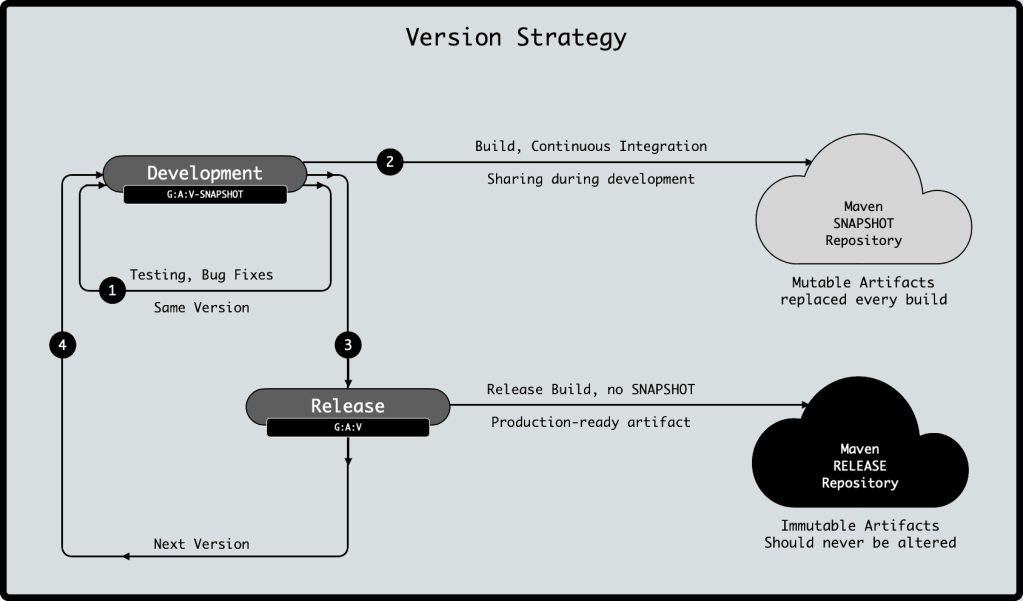
Controlling Versions in Maven
Version Ranges in Maven
Maven supports version ranges. At times it is possible for a POM to be a bit flexible in accepting a range of versions of a dependency. This flexibility can stem from some underlying assumptions such as backward compatibility or a minimal dependence on the said dependency. It is also a means of restricting an allowed version to be within a specified set of versions.
Hard versus Soft Requirements
Maven version values can either be a soft requirement or a hard requirement.
As the names suggest, a soft requirement is a replaceable version with the current value being the preferred version to use. If the dependency graph contains a different version with alternate requirements, it can be picked over the current version value. This is more often a single value than a range. Most POMs use a soft requirement. Specifying a version without any range or restrictions (for example 1.3.8 or 2.0.0-alpha) implies it is a soft requirement.
A hard requirement is a pattern that restricts the version to be selected. A hard requirement uses square brackets (inclusion) and parenthesis (exclusion) to determine allowed version values. A few examples of hard requirements are tabulated below.
| Range | Notes |
| [1.0] | Use exactly version 1.0. |
| (,1.0] | Use any version <= 1.0 Flexible on versions before and including 1.0, Restrict any values above 1.0. Note the initial comma. |
| [1.0,1.3] | Use any version inclusive of 1.0 up until 1.3 including 1.3 |
| [1.0,1.2) | Use any version inclusive of 1.0 and above, until and excluding 1.2 |
| [1.2,) | Use any version inclusive of 1.2 and above. |
| (,1.0],[1.2,) | Use any version <=1.0 or any version >= 1.2 |
| (,1.1),(1.1,) | Use any version except 1.1 |
Version ranges are a powerful option. One of the major drawback of using ranges, in general, is a lack of build reproducibility. There is no guarantee of the version that will be chosen if a range is provided. There are better options using dependencyManagement to control versions. This blog will also cover the maven-enforcer-plugin, which can do more with version ranges.
Using dependencyManagement and pluginManagement
As was covered in Part 5, versions for a dependency can be controlled using a dependencyManagement section.
A quick recap, the dependencyManagement element allows for a lookup reference where dependencies can be listed via their location coordinates that must include the GAV coordinates (groupId, artifactId, version), may include distinguishers (classifier, type) and may include exclusions, scope or an optional flag.
Dependencies then declared in the POM directly can be listed with just the groupId and artifactId, the rest of the information can be fetched from the lookup to the dependencyManagement block.
Not everything listed in the dependencyManagement block need be used in the actual POM, since none of the dependencies listed in the block are directly used in generating an effective POM.
As was covered in Part 8, versions for a plugin can be controlled using a pluginManagement section.
A similar recap for pluginManagement applies, where a plugins can be listed via their GAV coordinates, and may optionally include dependencies, configuration, and flags for extensions and inherited.
Similar to the pattern followed by dependencyManagement, plugins configured in pluginManagement are not directly used in the build, but are looked up, when encountered in the POM’s build section with a groupId and artifactId.
Using a maven-enforcer-plugin
Maven provides a very versatile tooling plugin to allow centralized control over the build environment from a single POM (inherited to child POMs) and allows for greater flexibility in version specifications by supporting version ranges.
The actual name of the plugin: Maven Enforcer Plugin – The Loving Iron Fist of Maven TM. Link to the goals of the plugin: http://maven.apache.org/enforcer/maven-enforcer-plugin/plugin-info.html
The enforcer plugin deserves a blog unto itself, but as a preview, the enforcer provides built-in rules and a capability to extend the same with custom rules via a rich Maven Enforcer Rule API. Custom rules require creating a custom enforcer, by extending the EnforcerRule. The custom rule is packaged as a jar and included as a dependency to the plugin. The rule can be invoked by including the fully-qualified class name under the configuration for the plugin.
Link to the enforcer API: http://maven.apache.org/enforcer/enforcer-api/writing-a-custom-rule.html
Enforcer provides built-in rules for bannedDependencies, dependencyConvergence, requirePluginVersions, requireReleaseVersions, requireSameVersions etc. and allows for custom rules to be defined, which can help control the versions and fail the build if the rule is not satisfied.
Link to built-in rules: http://maven.apache.org/enforcer/enforcer-rules/index.html
Handling Backward Compatibility
Projects, especially libraries, strive not to break backward compatibility. Backward compatibility is a guarantee that upgrading to the newer version of the library WILL NOT break existing usage. While this goal is utopian, there is a necessity to, at times, break backward compatibility, due to either security constraints or to allow enhancements that are not possible without such a breaking change.
In such situations, it is best to rename the groupId or artifactId so the dependency resolution conflicts are more visible and appropriate exclusions or changes in the project code can be made. Changing the groupId or artifactId provides the necessary separation to indicate a breaking change. It also allows for a continued support of the prior functionality, if deemed necessary.
That’s a wrap on this blog. Have fun !
| Part 8 Maven Plugins | Index | Part 10 To Be Determined |


 C. V. Guntur